Frequently asked questions
Short answers to the questions we get most often.
1.What do I see in Adobe Acrobat (Reader)?
Open your signed PDF in Adobe Acrobat Reader. A bar at the top shows that the document is signed. In the signature panel you can see that the signature is valid and that the document has not been changed since you signed. It is a qualified signature under the European eIDAS regulation: trust comes from the official EU trusted lists, and an embedded timestamp proves when you signed. That keeps the signature verifiable in the long term.
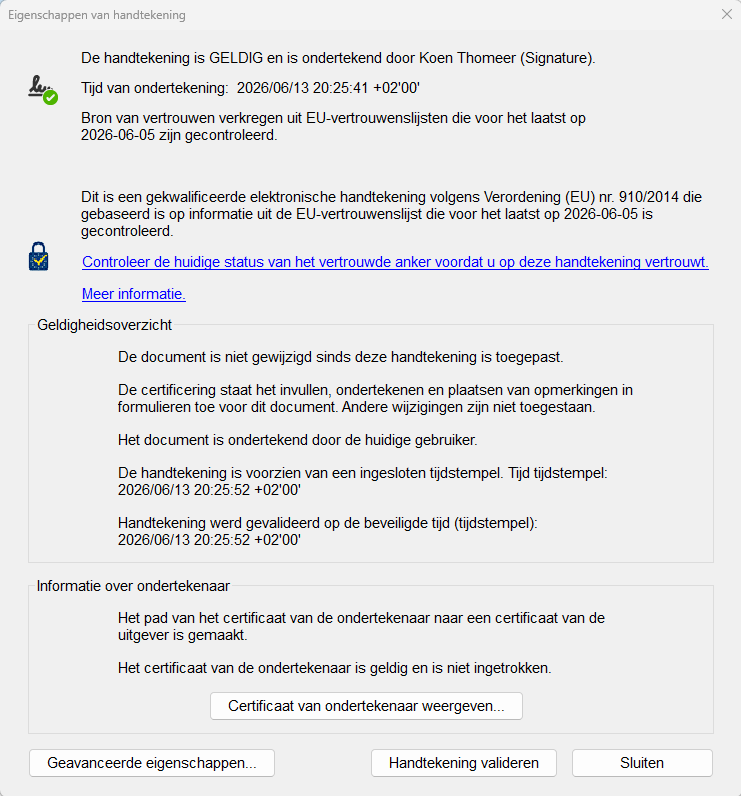
This is what a successful signature looks like in Adobe Acrobat Reader.
2.Where can I have my signed PDF validated independently?
Don't want to rely on Adobe alone? The European Commission offers a free, official validation tool. Upload your signed PDF there to get an independent validation report.
Open the European Commission validation tool →
Signing with an older eID card? The tool may show a note that "the organisation name is missing in the trusted certificate". That's normal and not an error: older cards chain to an older government root certificate that doesn't carry an organisation name. Your signature stays valid and qualified.
3.What do I need to install to use this tool?
You need two free programs, plus a card reader and your eID:
- eID Middleware — the official Belgian eID software
- BeID helper — the helper that lets your browser talk to your eID
Works in Google Chrome, Microsoft Edge, Firefox, Safari and most browsers.
For Safari (macOS) you also need the Safari extension — install it and enable it via Safari → Settings → Extensions.
4.I still have a question, found a bug or have a suggestion.
Feel free to let us know through this short form. We read everything and use it to improve the tool.
5.Where does my signature appear in the document?
After uploading, you choose the spot and page by dragging a signature box. The signed document shows a stamp there with your name, national register number and the date, derived from your eID certificate.
6.What happens to my data?
Your PDF stays on the server only while you are using it. It is deleted after the download, and an abandoned attempt is cleaned up within an hour and a half.
For visitor statistics we count visits from the web server logs at our hosting provider. No cookies or trackers are involved, and we only keep totals. Your IP address and browser are used only to count visitors and do not end up in the statistics.